The complete guide · Updated November 2026
How to Get Your Business Found on ChatGPT and AI Search (2026 Guide for Canadian Businesses)
By Aaron Lim, founder of BB Media · Updated
Short answer
To get your business found on ChatGPT and AI search, make your basic facts (name, address, phone, hours and services) identical everywhere, claim your listings on Google Business Profile, Bing Places, Apple Business and ChatGPT's new Business Hub, and keep honest reviews coming in.
Then give AI something worth quoting: a fast website that answers real customer questions in plain words, clear service and city pages, and mentions on trusted local sites, because claiming a listing on its own does not make AI recommend you.
The basics
How AI search picks a business to recommend
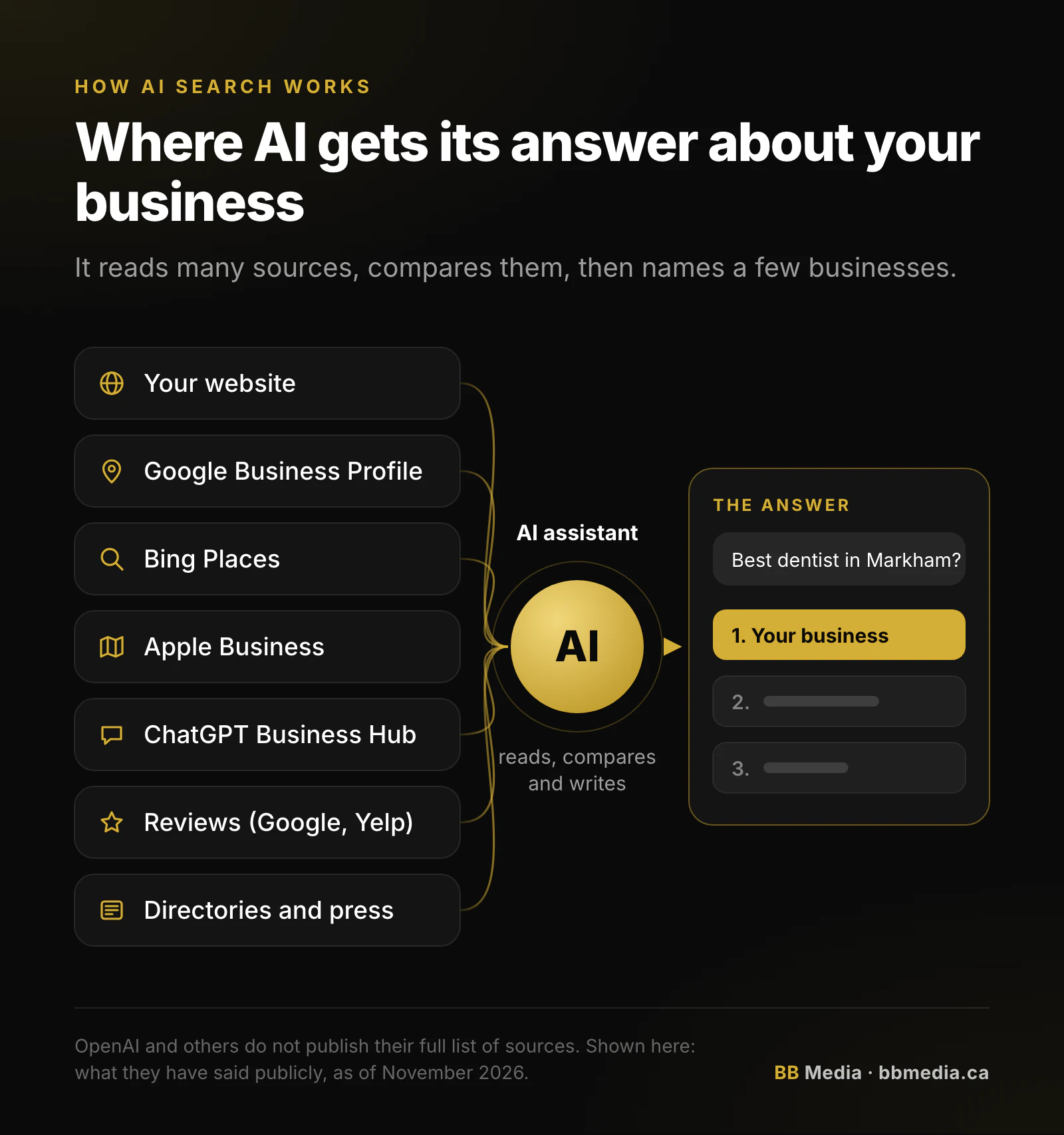
When someone asks ChatGPT "best dim sum in Markham" or asks Google "who fixes iPhones near Yonge and Finch", the AI does not invent an answer from thin air. It looks things up. It reads business listings, maps data, review sites, news, directories and websites, then writes a short answer and usually names a few businesses.
So getting recommended is not a trick. It comes down to three things: the AI can find accurate facts about you, it sees other trusted sources saying good things about you, and your own website explains clearly what you do, where and for whom. Here is where each assistant gets its local information, as far as the companies have said publicly as of November 2026.
- ChatGPT. OpenAI says ChatGPT search uses third party search providers and trusted partners for local info such as nearby business listings, and it shows reservation availability from OpenTable, Resy or Yelp depending on location. It does not publish a full list of its local data sources. A data deal between Yelp and OpenAI was widely reported in July 2026. Your website only shows up in ChatGPT search if you allow OpenAI's crawler, OAI-SearchBot.
- Google AI Overviews and AI Mode. These run on Google Search and Google Maps data. Google says your Business Profile (and a Merchant Center feed if you sell products) is how local business info gets into its AI answers, and that there are no extra requirements, special schema or AI text files needed. AI Mode has been available in Canada in English since August 2025.
- Gemini. Gemini leans on the same Google Search and Maps data. Ask Maps, Gemini inside Google Maps, was reported to reach Canada in August 2026 and draws on places, reviews and photos.
- Microsoft Copilot. Copilot uses Bing. Bing Places for Business feeds Bing Search and Maps, and Microsoft has said deeper Copilot integration is coming.
- Perplexity. Perplexity has said it uses Yelp for local results and maps. It also crawls the open web with PerplexityBot. There is no Perplexity listing you can claim for a local business.
- Siri and Apple Maps. Your Apple Business place card shows up in Apple Maps, Siri and other Apple apps, and Applebot crawls websites for Siri, Spotlight and Safari suggestions.
What is not public: nobody outside these companies knows exactly how they weigh one source against another. Be careful with anyone who promises a ranking or quotes a precise share of data from one provider. What we do know is consistent across all of them: accurate listings, real reviews, trusted mentions and a clear website.
Our advice: Try it now. Ask ChatGPT, Gemini and Perplexity the question your customers would ask, like "best physiotherapist in Richmond Hill". Note who gets named and which sites get cited. That list is your real competition in AI search. Our free AI visibility check does a version of this for you.
Step 1 · Before you claim
Before you claim: get your facts straight
Most businesses skip this part and go straight to claiming. That is backwards. If your address is written three different ways across the internet, AI has to guess which one is right, and guessing makes it less likely to recommend you at all. Spend a few hours here first. It makes every later step easier.
- Pick one exact name, address and phone, then use it everywhere. Use your real world name as it appears on your sign, with no keywords stuffed in. Write the address the same way every time (Unit 208 or Suite 208, pick one) and use a local phone number. Check your website footer, Google, Bing, Apple Maps, Yelp, Facebook, Instagram, delivery apps and directories.
- Set your hours, including holidays. Wrong hours are the fastest way to lose trust with a customer and with AI. Add special hours for Canadian statutory holidays before they happen.
- Make sure your website covers the basics. A homepage that says in one sentence what you do and where, a page for each main service, your address and phone as text (not only in an image), a working contact page, and a site that loads fast on a phone.
- Choose the right category. On every platform, pick the main category that finishes the sentence "this business IS a". Fewer, more accurate categories beat a long list.
- Add real photos. Storefront, interior, team, products and work you have done. Current photos help people and give AI more to read about you.
- Start collecting reviews the honest way. Ask every real customer, not only the happy ones. No discounts or freebies in exchange for reviews and no reviews from staff without saying they work for you. More on this below.
- Add basic structured data to your website. A small block of LocalBusiness schema tells search engines your name, address, phone, hours and profiles in a format machines read without guessing. Details are in Step 3.
Our AI search readiness checklist walks through each of these with examples.
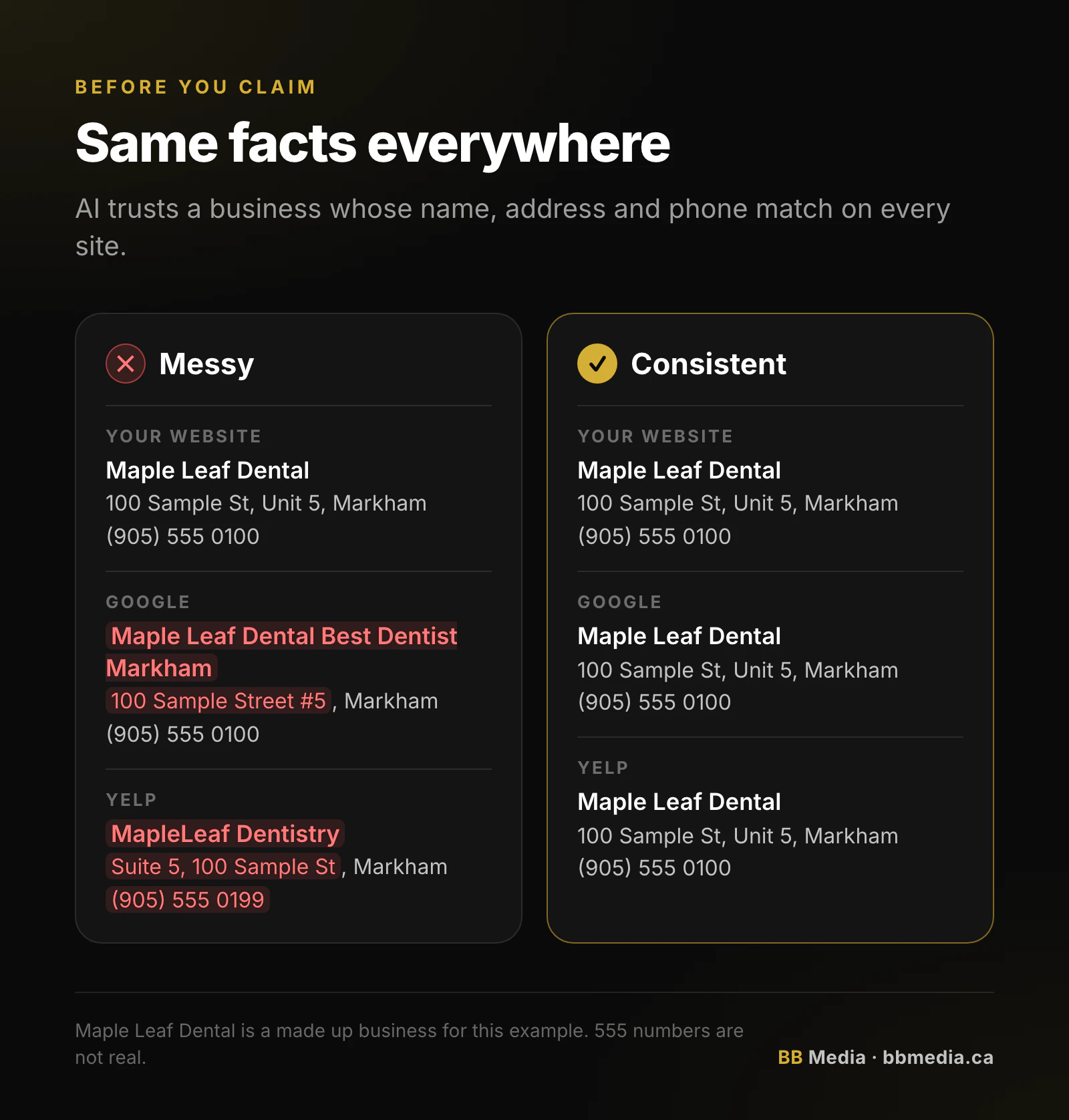
Our advice: Google's own guidelines say your listing name should be your real world name, with no taglines, keywords, phone numbers or website addresses in it. Stuffing "Best Sushi Toronto" into your name risks suspension, and it does not help with AI either.
Step 2 · Claim your listings
Claim your listings on ChatGPT, Google, Bing and Apple
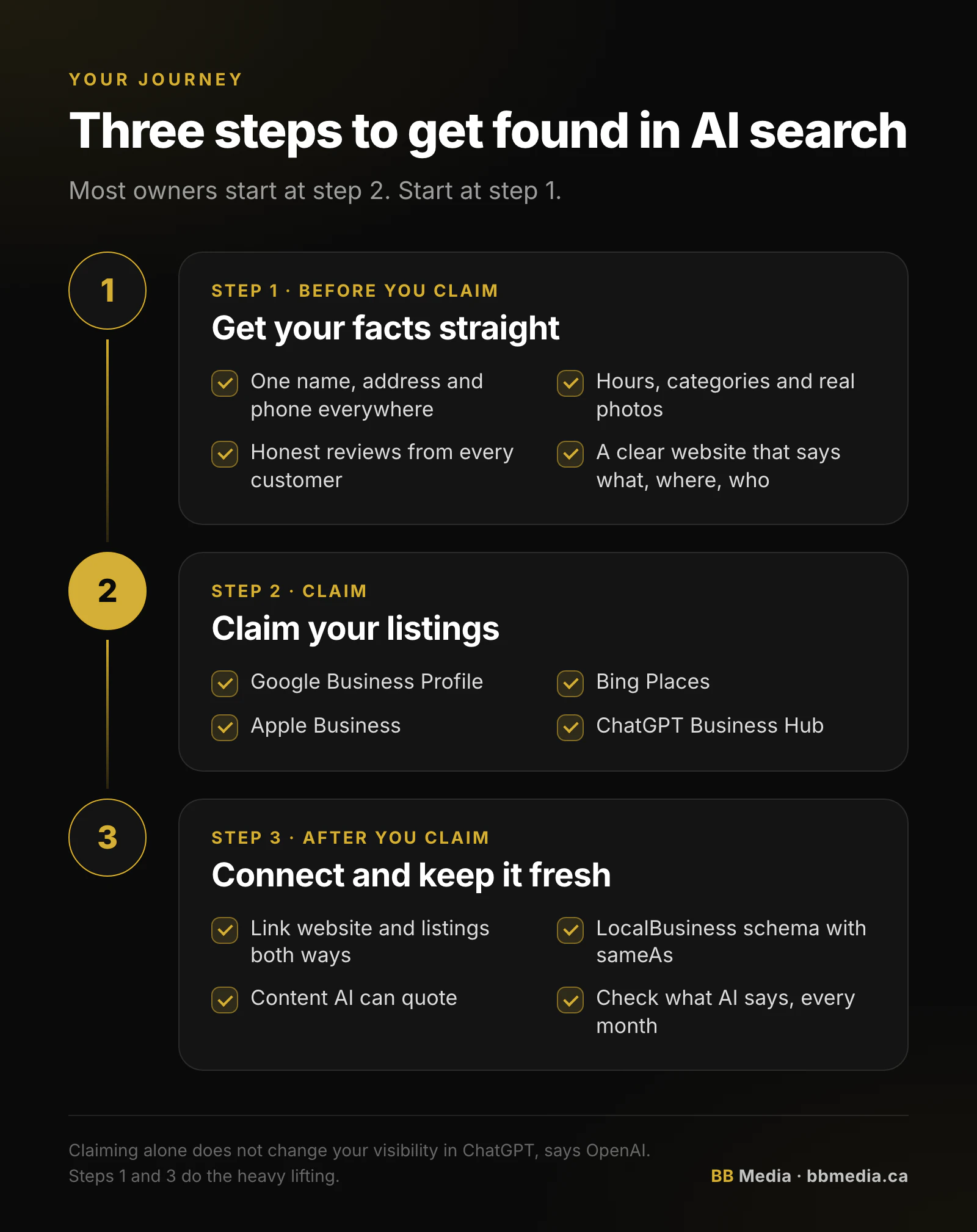
Each AI assistant leans on a different set of listings, so you want all four. Do them in this order: Google first (it is the biggest source and Bing can import from it), then Bing, then Apple, then ChatGPT. One honest warning before you start, straight from OpenAI: claiming a profile does not change its visibility in ChatGPT on its own. Listings make sure AI has correct facts. The work in Step 3 is what makes AI want to recommend you.
ChatGPT Business Hub
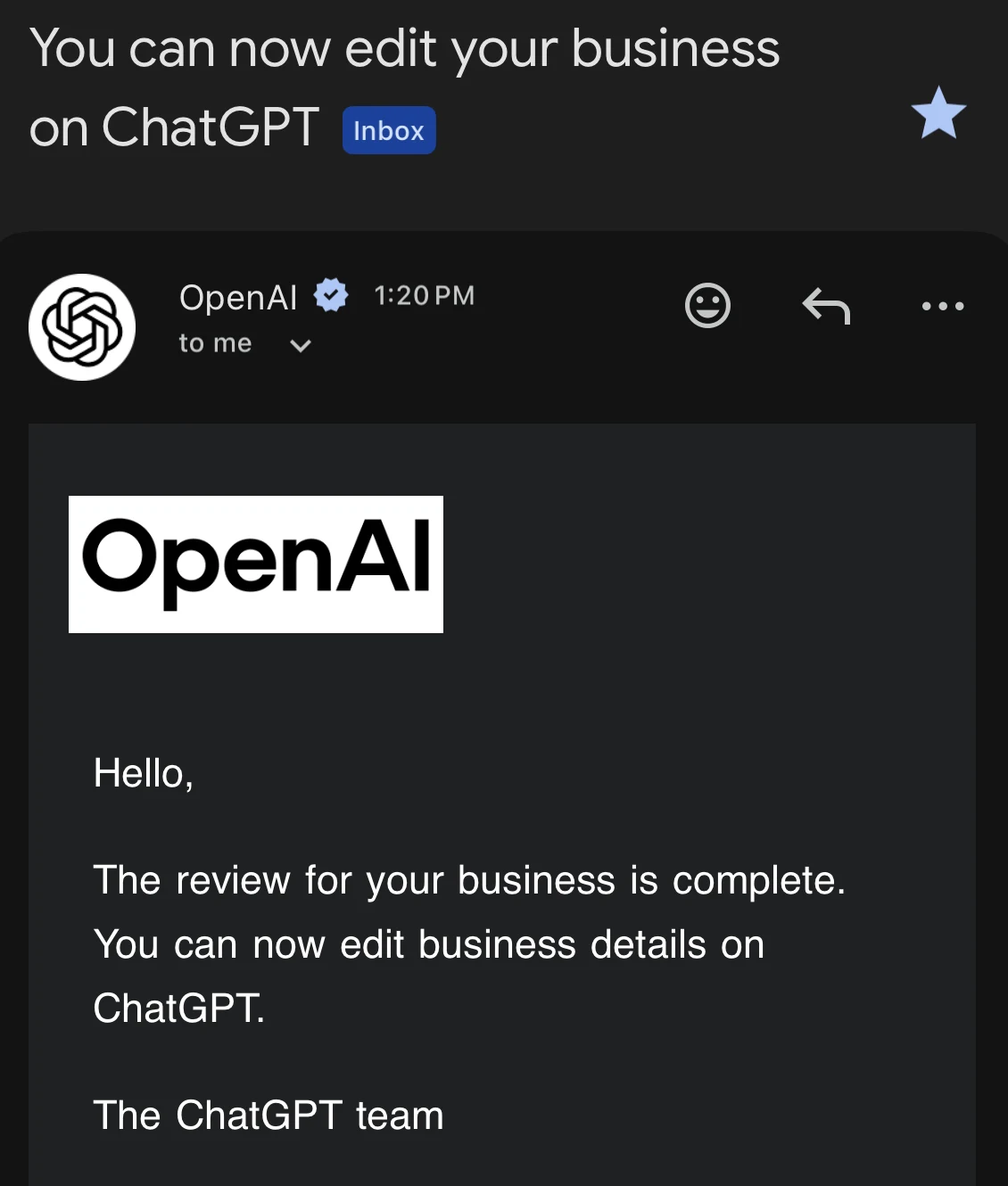
OpenAI launched Businesses in ChatGPT as a beta on November 10, 2026. Through Business Hub, an owner or someone authorized to represent the business can claim a profile, edit its details and see basic insights. OpenAI does not mention a fee for claiming, and you do not need an ads account.
- Sign in and search. Go to Business Hub (chatgpt.com/business-hub) with your ChatGPT account and search for your business.
- Claim and verify the connection. Depending on the listing, OpenAI asks for a code by business phone (text or automated call), a code to your business email, a DNS TXT record on your website domain, or a Shopify connection. OpenAI reviews the claim and emails you a decision.
- Verify your identity with Persona. Before you can publish changes, see insights or connect a product feed, you complete an identity check that may ask for government ID, business registration and proof that you can act for the business. Use your legal registered name and put your trade name in the DBA field.
- Fill in your profile. Website, description, category, logo, cover photo, delivery and return policies. Online stores can add a product feed by CSV or hosted URL, or reuse a Shopify catalog. OpenAI reviews edits before they go live.
- Add your team or agency. The admin who claimed the profile can give teammates and an agency their own access, so nobody has to share a password.
The Canada caveat, as of November 26, 2026. Since November 19, ecommerce and online service businesses outside the US can claim their business. For physical locations, OpenAI's help article still says local stores and restaurants can only claim an existing U.S. listing. Some Canadian local businesses have reported that they could claim anyway, and many others see a waitlist. Our advice: try now, join the waitlist if you see one, and have everything from Step 1 ready so you are done in minutes when it opens.
Full walkthrough: how to claim your business on ChatGPT. OpenAI's own instructions are in its help article.
Google Business Profile
This is the single most important listing for AI search in Canada, because it feeds Google Maps, AI Overviews, AI Mode and Gemini. Google ranks local results on relevance, distance and prominence, and says plainly there is no way to pay for a better local ranking.
- Search for your business on Google Maps and claim it, or add it if it is not there.
- Verify. Google picks the method for you based on your business type and region: phone or text, email, live video call, a recorded video, a postcard, or instant verification through a website already verified in Search Console. Reviews can take up to five business days.
- If you serve customers at their place, hide your address and list up to 20 service areas instead. Virtual offices and P.O. boxes are not allowed.
- Complete every field. Category, hours, holiday hours, services or products, attributes, description, website and photos.
- Reply to reviews, good and bad, in a calm and human way. Google lists responding to reviews as one of its own tips.
- Post updates now and then so the profile shows the business is active.
Step by step with screenshots of what to fill in: Google Business Profile for AI search.
Bing Places for Business
Bing powers Microsoft Copilot. Microsoft relaunched Bing Places in October 2025, moving it to bing.com/forbusiness with a quicker way to import from Google, and has said deeper Copilot integration is on the way.
- Sign in at bing.com/forbusiness with a Microsoft, Google or work account.
- Choose Import from Google if your Google profile is already verified. Bing's help pages say this can take up to two days, and a listing verified on Google usually does not need a separate Bing check.
- If you add the business by hand, verify it by phone, text or email when offered.
- Check the details after the import. Hours, categories and photos sometimes need a touch up.
- Fix things on Google first. Imported listings keep syncing from your Google profile, so changes made only on Bing can get overwritten.
Apple Business (formerly Apple Business Connect)
Apple replaced Business Connect with Apple Business in April 2026, and existing place cards moved over automatically. It is free, and in Canada it supports brand and location management (your place card). Your place card shows up across Apple Maps, Siri and other Apple apps, which matters because many of your customers search on an iPhone.
- Sign in to Apple Business with an Apple Account and verify your organization.
- Search for your location on Apple Maps data and claim it, or add a new one.
- Verify the location. If Apple has a phone number on record, it can call that number with a four digit code. Otherwise it may ask for documents, which can take a few business days.
- Complete your place card. Hours, category, website, phone, photos and a logo.
- Keep it in sync with Google and Bing whenever anything changes.
Both Microsoft and Apple listings are covered in Bing Places and Apple Business. Apple's own steps are in its support guide.
Our advice: While you are at it, claim your free Yelp business page and fix the details there too. Perplexity uses Yelp for local results, and reviews and listings on Yelp are read widely across the web.
Step 3 · After you claim
After you claim: connect everything and add structured data
Now that the listings exist, help AI understand that they all describe the same business, and that your website is the main source of truth.
- Link your website both ways. Every listing should point to your website, and your website should link out to your Google, Apple, Yelp and social profiles (a footer row of icons is fine).
- Add LocalBusiness schema. Use the most specific type that fits (Restaurant, DaySpa, Dentist, LegalService and so on) with your name, address, phone with country code (+1), website, opening hours and map coordinates. Add a sameAs list with the URLs of your Google, Yelp, Facebook, Instagram and other profiles. That list is how you tell machines "these are all me". See schema.org/LocalBusiness.
- One page per location. If you have more than one location, each one gets its own page on your site with its own address, hours, phone and schema, linked from that location's listings.
- Keep it in sync. When anything changes, update your website first, then every listing the same day.
Let the AI crawlers in (and be honest about llms.txt)
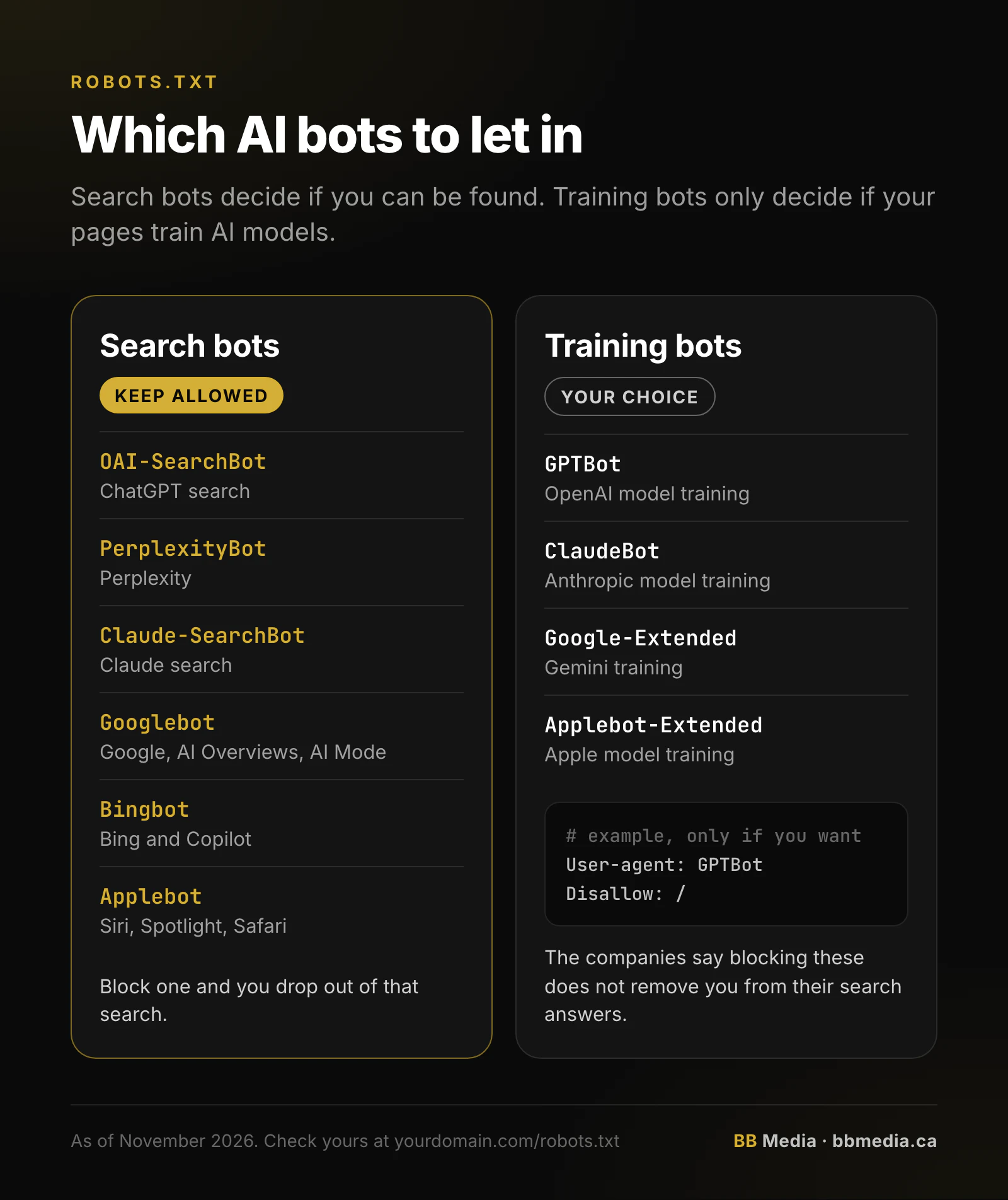
AI tools can only quote what they can read. Many sites block AI bots by accident, through a security plugin, a firewall rule or an old robots.txt line someone copied years ago. Open yourdomain.com/robots.txt and make sure these are allowed:
- OAI-SearchBot (ChatGPT search). OpenAI says blocking it removes you from ChatGPT search results.
- PerplexityBot (Perplexity search).
- Claude-SearchBot (Claude's search).
- Bingbot (Bing and Copilot) and Googlebot (Google Search, AI Overviews and AI Mode).
- Applebot (Siri, Spotlight and Safari suggestions).
You can block training bots without hurting search. GPTBot, ClaudeBot, Google-Extended and Applebot-Extended control whether your content trains AI models. The companies say blocking them does not remove you from their search answers. If you want to stay out of training but stay findable, block those and keep the search bots above allowed.
About llms.txt. llms.txt is a proposal for a plain text summary file that helps AI tools read a site. Google said in June 2026 that it is not needed for Google Search and has no effect on rankings, and no major AI search provider has publicly said it uses llms.txt to choose businesses. It is cheap and harmless, so add one if you like, but it is optional. Do not pay anyone extra for it.
Our AI ready website guide has a robots.txt you can copy and a full technical checklist.
Write content AI can quote
AI answers are built from sentences it can lift and trust. Marketing fluff like "we are passionate about excellence" gives it nothing to work with. Specific, factual, plain sentences do.
- Answer the question in the first paragraph. If the page is about teeth whitening in Vaughan, the first two sentences should say what it is, who it suits, roughly how long it takes and where you are. Details come after.
- One page per service, and one per city or area you really serve. "Bathroom renovation in North York" with real projects, real neighbourhoods and real answers beats one page that lists 40 services.
- Add an FAQ to key pages using the real questions customers ask on the phone and in DMs. Google stopped showing FAQ rich results in 2026, but the questions and answers still help people and give AI clean text to quote.
- Show proof. Photos of real work, named awards, press, certifications and licences, and how long you have been in business. AI looks for signs that you are a real, established business.
- Keep it current. Put a visible "updated" date on key pages and refresh prices, menus and team details when they change.
Our advice: A quick test for any page: if someone copied only your first paragraph into a chat, would it fully answer the question in the page title? If not, rewrite the first paragraph.
Keep reviews flowing and earn mentions
Reviews and third party mentions are how AI judges whether people trust you. Both need to be earned honestly, and in Canada there are real rules.
- Ask every customer, not only the happy ones. Google bans review gating (only asking people you expect to be positive), paying for reviews, and offering discounts or freebies for reviews.
- Staff must disclose. The Competition Bureau has warned that employees who review their own employer or a competitor must disclose the connection, and the business can be liable.
- Follow CASL when you email or text the ask. Only message people who gave consent or have implied consent (a purchase within the last two years, or an enquiry within the last six months), say who you are, include your mailing address and contact info, and give a working unsubscribe.
- Reply to reviews, especially critical ones, with a short, calm, specific answer.
- Get listed where AI looks. Respected directories for your industry, your BIA or chamber of commerce, Yelp and industry associations.
- Earn local press and community recognition. Local news stories, food and lifestyle blogs, sponsorships and community awards are exactly the kind of independent mention AI trusts.
Keep score
How to measure your AI search visibility
You cannot see inside ChatGPT, but you can measure more than most owners think. These are all free.
- Google Analytics 4, AI Assistant channel. GA4's default channel group now has an AI Assistant channel for visits from ChatGPT, Gemini, DeepSeek, Copilot and Grok. It does not include Google AI Overviews or AI Mode. Some AI visits still show up as Direct, because apps often hide where a click came from.
- Google Search Console, Generative AI performance report. Shows impressions in AI Overviews and AI Mode combined, by page, country and device. Impressions only, no clicks.
- Bing Webmaster Tools, AI Performance. Shows how often your pages are cited in Copilot and Bing AI answers, and for which topics.
- ChatGPT Business Hub insights. Once you are verified: mentions, website clicks and discovery topics over the past 28 days. Small numbers may show as blank, which does not mean zero.
- A monthly prompt test. Write down 10 questions a customer would really ask, mixing service and city ("best kids dentist in Markham", "who installs heat pumps in Ajax"). On the same day each month, ask ChatGPT, Gemini, Perplexity and Google AI Mode. Record whether you are named, what is said about you, and which sites are cited. The cited sites are your to do list.
More detail, including how to set up each report: how to measure AI search visibility.
Six common mistakes
- Claiming listings and stopping there. OpenAI says claiming alone does not change visibility. Listings are the foundation, not the result.
- Different details in different places. An old phone number on one directory or a renamed business on Facebook confuses people and machines alike.
- Blocking AI search bots by accident. A firewall or plugin blocking OAI-SearchBot or Bingbot quietly keeps you out of ChatGPT and Copilot answers.
- Buying or gating reviews. It breaks Google's rules and can break Canadian law, and Google has reportedly been blocking new reviews on profiles caught doing it.
- Thin, vague website pages. One homepage with a list of services gives AI nothing to quote. Write a real page for each service and area.
- Paying for magic. Nobody can guarantee a spot in ChatGPT or Google AI answers, and llms.txt files or special AI schema will not do it on their own. Be wary of anyone who says otherwise.
Do it yourself
A 30 day plan
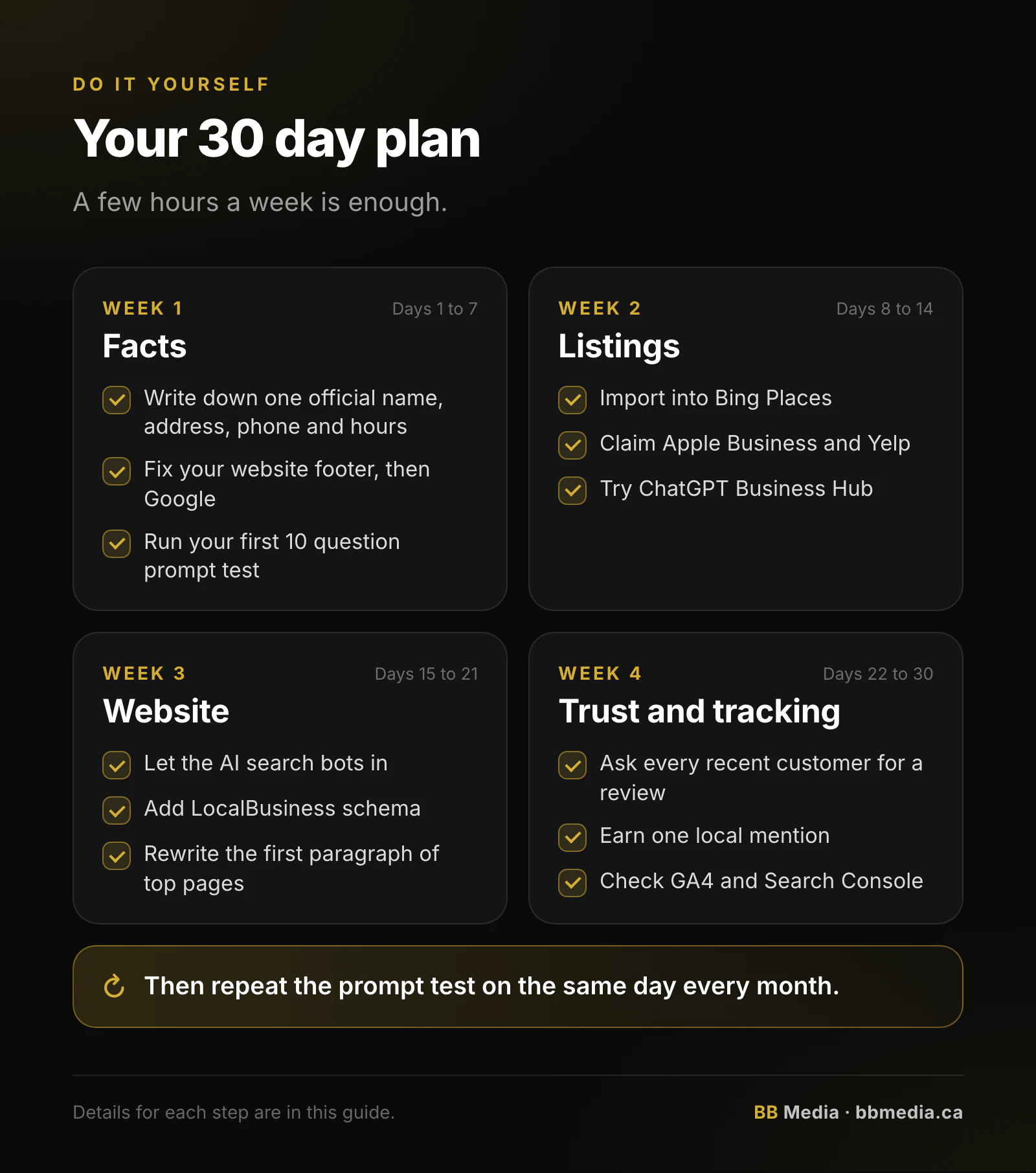
If you want to do this yourself, here is a realistic plan for an owner with a few hours a week.
- Week 1: facts. Write down your one official name, address, phone, hours and categories. Fix your website footer and contact page first, then Google Business Profile. Run your first 10 question prompt test so you have a starting point.
- Week 2: listings. Import into Bing Places, claim Apple Business and your Yelp page, and try to claim on ChatGPT Business Hub (join the waitlist if offered). Fix the biggest directories and social profiles.
- Week 3: website. Check robots.txt allows the search bots, add LocalBusiness schema with sameAs links, rewrite the first paragraph of your top pages, and add one new service or city page that answers real questions.
- Week 4: trust and tracking. Start a CASL compliant review ask for recent customers, reply to every recent review, pitch one local mention (a directory, BIA, community group or local blog), and check the AI Assistant channel in GA4 and the AI reports in Search Console and Bing Webmaster Tools.
Then repeat the prompt test every month. AI answers change slowly and then all at once, so a steady habit beats a burst of effort.
If you would rather have it done
Who BB Media is for
Everything above is doable on your own. Plenty of owners simply do not have the hours, or want it done properly the first time. That is where BB Media comes in. We are a full in house team in Markham (social, content, KOL and creator marketing, ads, websites and GEO) working with businesses across the GTA and Canada.
- Owners who want it done. We fix your facts, claim and verify your listings, set up schema and crawler access, write the service and city pages, and run the monthly prompt test for you. Because we build, host and manage websites, we can fix site issues directly instead of sending you a list.
- Multi location brands and franchises. One consistent setup across every location: a page per location, synced listings and per city reporting. See our GTA AI search optimization pages, for example Markham and Mississauga.
- Brands that also want Chinese speaking customers. This is an extra edge most agencies cannot offer. We write native Chinese content and run RedNote and WeChat alongside your English work, so you show up when customers ask AI in Chinese as well.
- Agencies. If you run an agency and want GEO for your own clients, see white label GEO.
Our own site gets real visits and enquiries from AI search, which is how we know this works. See our AI search results, our awards and our client work.
Proof, not promises
We test it on our own business first
AI search on our own site
AI answers already send us real buyers. From August to November 2026, ChatGPT, Gemini and Perplexity sent bbmedia.ca 27 to 55 visits a month, and 9 real enquiries came to us through AI search.
Voted by the community
Voted #1 (Platinum) in Social Media Marketing and in Digital Marketing, Community Votes Markham 2026
Brands we have worked with (some of them)
- Meet Fresh
- Ten Second Noodle
- Hazukido
- QJD Peking Duck
- Gyumono
- 6 Cloud
- Noon Moment Bubble Tea
- Bento 886
- Sarang Kitchen
- Yue Spa
- Water Sense Spa
- Bliss Head Spa
- PlayPlex Game
- Paragon Badminton
- Vision Badminton
- Exact Sciences Canada
Launches we ran for clients were covered by CBC, CTV News Toronto, Toronto Life, blogTO, NOW Toronto, Streets of Toronto, Taste Toronto. See the work →
How BB Media does this for you
We start with a free AI visibility check: we ask the AI assistants your customers use the questions they would ask, and show you who gets named, what is said about you and which sources are cited. Then we fix the foundations (facts, listings, schema, crawler access), build the pages AI can quote, and keep reviews and local mentions coming in the right way.
BB Media was voted #1 (Platinum) in Social Media Marketing and in Digital Marketing at Community Votes Markham 2026, and launches we have run for clients have been covered by CBC, CTV News Toronto, Toronto Life, blogTO and NOW Toronto. Clients include Meet Fresh, Ten Second Noodle, QJD Peking Duck, PlayPlex Game and Yue Spa. Run the check, or book a free call and we will walk you through what we find.
- Phone: +1 647-886-3125
- Email: sales@brandboosty.ca
- BB Media (BrandBoosty Inc.), 620 Alden Rd Unit 208, Markham, ON L3R 8B5, Canada. We work with brands across the GTA and Canada.
- Monday to Friday, 9:30 AM to 5:30 PM Eastern
FAQ
Can I pay to be recommended by ChatGPT?
No. OpenAI says ChatGPT makes independent recommendations and that claiming a profile does not guarantee higher placement. ChatGPT does have ads, but they are labeled as sponsored and are separate from the regular answer. Google also says there is no way to pay for a better local ranking.
Can Canadian businesses claim their listing on ChatGPT Business Hub?
As of November 26, 2026, Canadian ecommerce and online service businesses can claim. For physical stores and restaurants, OpenAI's help article still says only existing U.S. listings can be claimed, although some Canadian businesses have reported success and many see a waitlist. Try anyway and join the waitlist if offered.
Is ChatGPT Business Hub free?
OpenAI does not mention any fee for claiming a business, and you do not need an ads account. It is a beta, so pricing for future features has not been announced yet.
How long does it take to show up in AI answers?
Fixing listings and your website takes a few weeks. AI answers then catch up at their own pace, often over a few months, and nobody can promise a date. That is why we suggest a monthly prompt test, so you can see change over time instead of guessing.
Do I need an llms.txt file?
No. It is an optional proposal. Google has said it is not needed for Google Search and does not affect rankings, and no major AI search provider has said it uses llms.txt to pick businesses. Adding one does no harm, but spend your time on listings, reviews and clear pages first.
Is GEO different from SEO?
They overlap a lot. Good SEO (accurate listings, a fast and clear website, real reviews, links and mentions) is the base of GEO. GEO adds a focus on being quoted and named inside AI answers: plain first paragraphs, FAQs, consistent facts across many sources and checking what the AI assistants actually say about you.
Should I block GPTBot or other AI bots?
That is your call. Blocking training bots such as GPTBot, ClaudeBot or Google-Extended keeps your content out of model training and, according to the companies, does not remove you from their search answers. Do not block the search bots (OAI-SearchBot, PerplexityBot, Claude-SearchBot, Bingbot, Googlebot) if you want to be found.
How do I know if AI is recommending my business today?
Ask it. Put 10 real customer questions to ChatGPT, Gemini, Perplexity and Google AI Mode and note whether you are named. For a quicker start, run our free AI visibility check.
Related
- AI search readiness checklist
- How to claim your business on ChatGPT
- Google Business Profile for AI search
- Bing Places and Apple Business
- Make your website AI ready
- Measure your AI search visibility
- GEO vs SEO: what changes for a local business in Canada
- Free AI visibility check
- AI search optimization in the GTA