Step 1 · Before you claim
Before You Claim: How to Prepare Your Business for ChatGPT and AI Search
By Aaron Lim, founder of BB Media · Updated
Short answer
Before you claim your business on ChatGPT, Google, Bing or Apple, write down one set of business facts (exact name, address, phone, website, hours, categories and services) and make every listing, your website and your social profiles match it word for word, then add real photos and start collecting honest reviews the legal way.
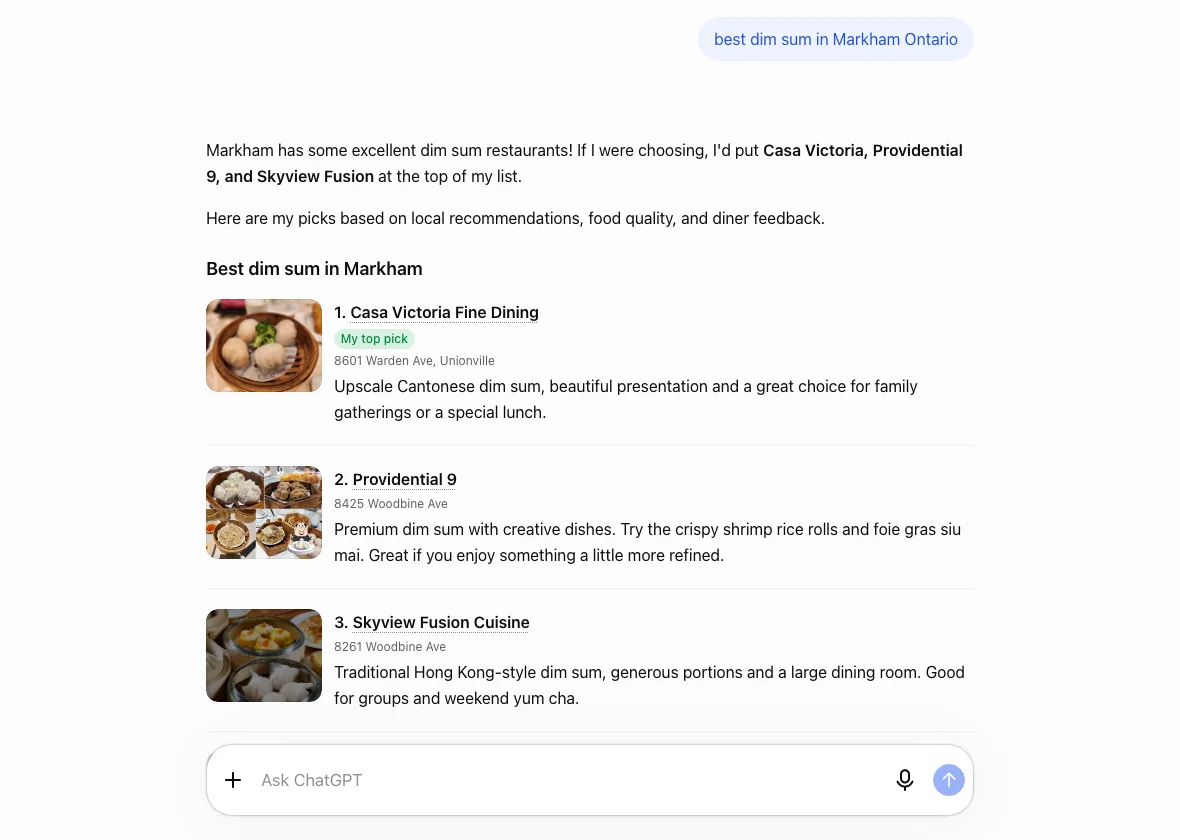
AI assistants build their answer from many sources at once. When those sources agree, the assistant can describe and recommend you with confidence; when they disagree, it hedges, gets details wrong or picks a competitor whose facts line up.
Why preparing comes before claiming
It feels natural to rush to the new thing first. OpenAI opened Business Hub for ChatGPT in November 2026, and every owner we talk to wants to know how to claim it. But claiming is just a door into one platform. What AI tools say about you comes from everything they can read: your website, Google, Bing, Apple Maps, Yelp, review sites, directories, news and social profiles.
OpenAI is direct about this. Its help centre says claiming a profile doesn't change its visibility in ChatGPT, and that ChatGPT may also use other sources when answering questions about your business. So the work that moves the needle is the boring part: the same correct facts everywhere, a website that states them clearly, real photos and a steady flow of genuine reviews.
Do this once, properly, and every claim afterwards takes minutes instead of days, because you copy and paste from one sheet.
The foundation
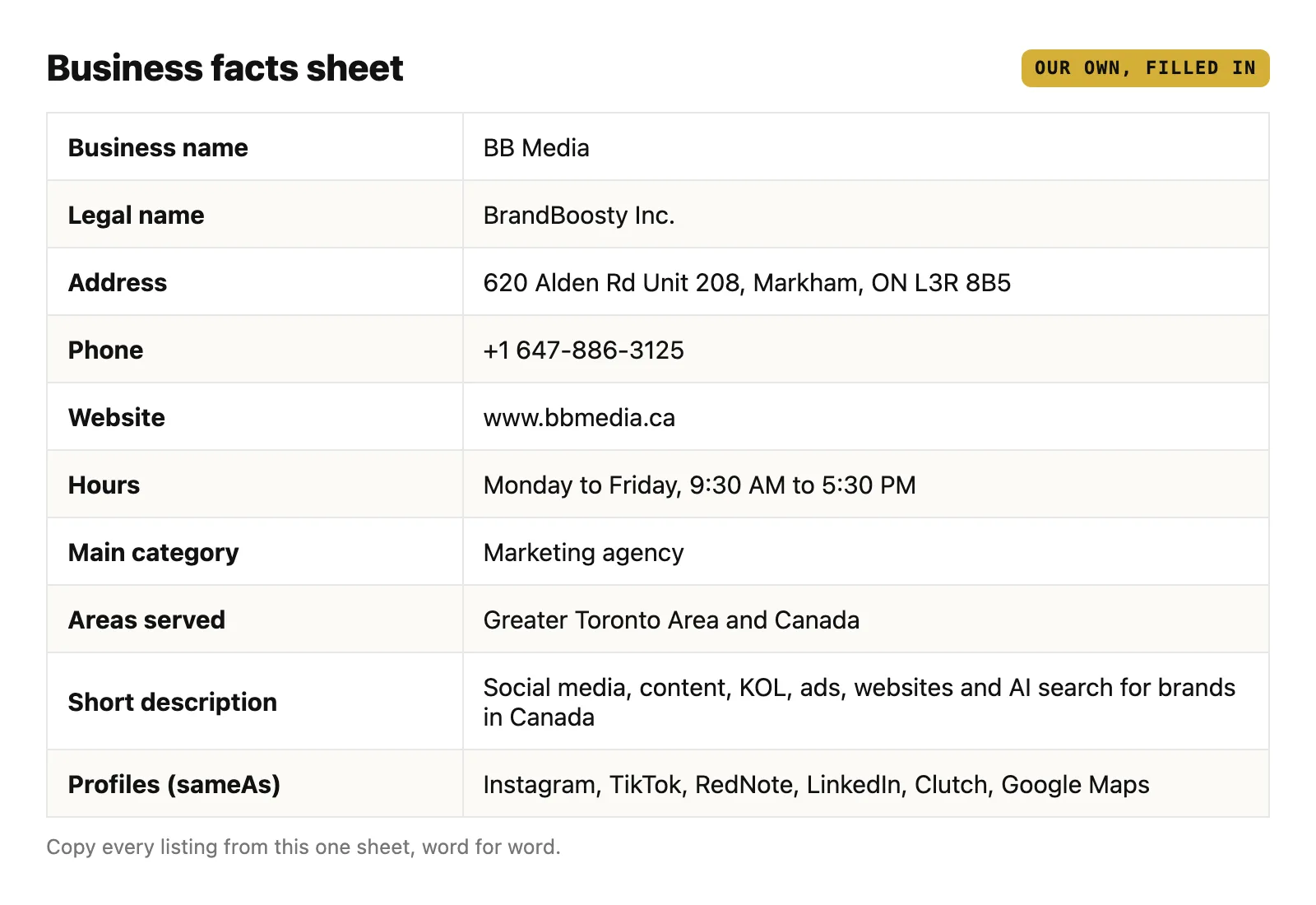
Build one business facts sheet
Open a shared document or spreadsheet and fill in the fields below. One person owns it. Every listing, every website edit and every agency you hire works from this sheet and nothing else.
- Business name exactly as it appears on your sign, receipts and website. Add your legal registered name on a separate line, because identity checks such as the one ChatGPT uses ask for it.
- Address in one fixed format (see the next section), plus the postal code and your unit number.
- Main phone number, a local number that rings at the business, written with the country code for the web: +1 and then the number.
- Website URL, the exact version you use (https, with or without www, but always the same).
- Regular hours for each day, plus holiday and seasonal hours.
- Primary category and up to a few secondary categories (more on this below).
- Services or menu items in the words customers actually use, with price ranges if you are comfortable sharing them.
- Service areas if you travel to customers: the cities or postal codes you really cover.
- Short description of two or three plain sentences: what you do, for whom, where, and what makes you different.
- Extras that people ask about: languages spoken, parking, accessibility, payment methods, booking or ordering links, year founded.
- Profile links: every listing and social account you own (this becomes your sameAs list later).
Our advice: Keep a change log at the bottom of the sheet. When you move, change your phone or adjust hours, you will know exactly which twenty places need updating.
Write your name, address and phone one exact way
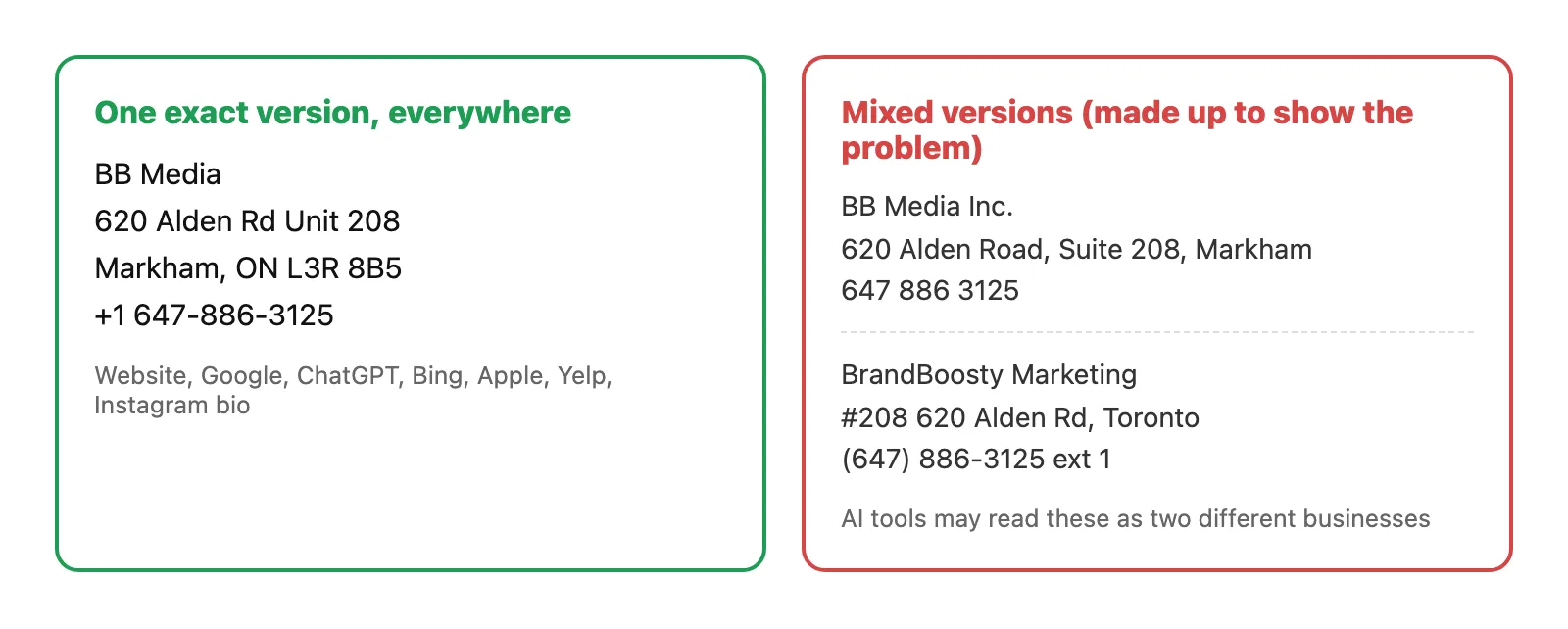
Marketers call this NAP: name, address, phone. Small differences look harmless to people but they make machines wonder whether two records are the same business. Pick one format and copy and paste it everywhere. Here is ours, exactly as it appears on our website footer, contact page and listings:
BB Media (BrandBoosty Inc.), 620 Alden Rd Unit 208, Markham, ON L3R 8B5, Canada. Phone +1 647-886-3125.
For your business name, follow Google's rule, which is a good rule for every platform: use the name you use in the real world, with no keywords, taglines, city names or phone numbers stuffed in. “Maple Dental” is a name. “Maple Dental Best Dentist Markham Open Late” gets profiles suspended and confuses AI.
- Unit vs Suite vs # vs a number in front of the street address. Choose one.
- Road vs Rd, Street vs St, East vs E. Choose one.
- An old phone number still on a directory or an old flyer that was scanned into a listing.
- Call tracking numbers on some listings and the real number on others.
- An old address that survived a move on Yelp, Facebook or a chamber of commerce page.
- Legal name on one site, trading name on another, and a nickname on Instagram.
Search your business name plus your city on Google, Bing and Apple Maps, and search your phone number on its own. Write down every place that shows a different version, then fix them one by one, starting with the platforms you control.
Choose categories and services carefully
Categories tell platforms what you are. Google's guidelines say to use as few categories as possible and to choose the one that completes the sentence “this business IS a”. A Korean barbecue restaurant is a Korean barbecue restaurant first, not a caterer, bar and event venue all at once.
Use the same idea on every platform, even though the category lists differ. Then list your services in plain customer language. People ask AI assistants things like “who does emergency furnace repair in Richmond Hill” or “head spa near Scarborough Town Centre”. If those words appear on your listings and your website, you can be matched to the question.
Hours, holiday hours and closures
“Is it open now” is one of the most common local questions people ask, by voice and by chat. Wrong hours lose customers twice: once when they arrive to a locked door, and again when they leave a one star review about it.
Set regular hours on every listing, add special hours before every holiday (Family Day, Good Friday, Victoria Day, Canada Day, Civic Holiday, Labour Day, Thanksgiving, Christmas and Boxing Day, plus Lunar New Year if it changes your hours), and mark temporary closures instead of leaving old hours up. Put the same hours in plain text on your website.
Photos that prove you are real
Real photos help people choose you, and they help platforms confirm the business exists. Take them yourself on a phone in good daylight if you have to; real beats polished stock every time.
- The outside of the building with your sign clearly visible, plus the entrance.
- The inside: counter, dining room, treatment room, showroom or workshop.
- Your team at work, with permission.
- Your best products, dishes or finished jobs.
- Your menu or price list, also typed out as text on your website.
- Your logo and a cover image, ready in square and wide sizes.
Our advice: Keep the original photo files in one folder with descriptive names such as markham-dental-clinic-front-entrance.jpg. You will upload the same set to Google, Bing, Apple, Yelp and ChatGPT Business Hub.
Do this the legal way
Reviews: how to ask without breaking the rules
Reviews are part of how platforms judge how well known and trusted you are. Google lists prominence, which includes reviews and ratings, as one of its three local ranking factors. But the rules on asking for reviews are strict, and in Canada there are two layers: the platform rules and the law.
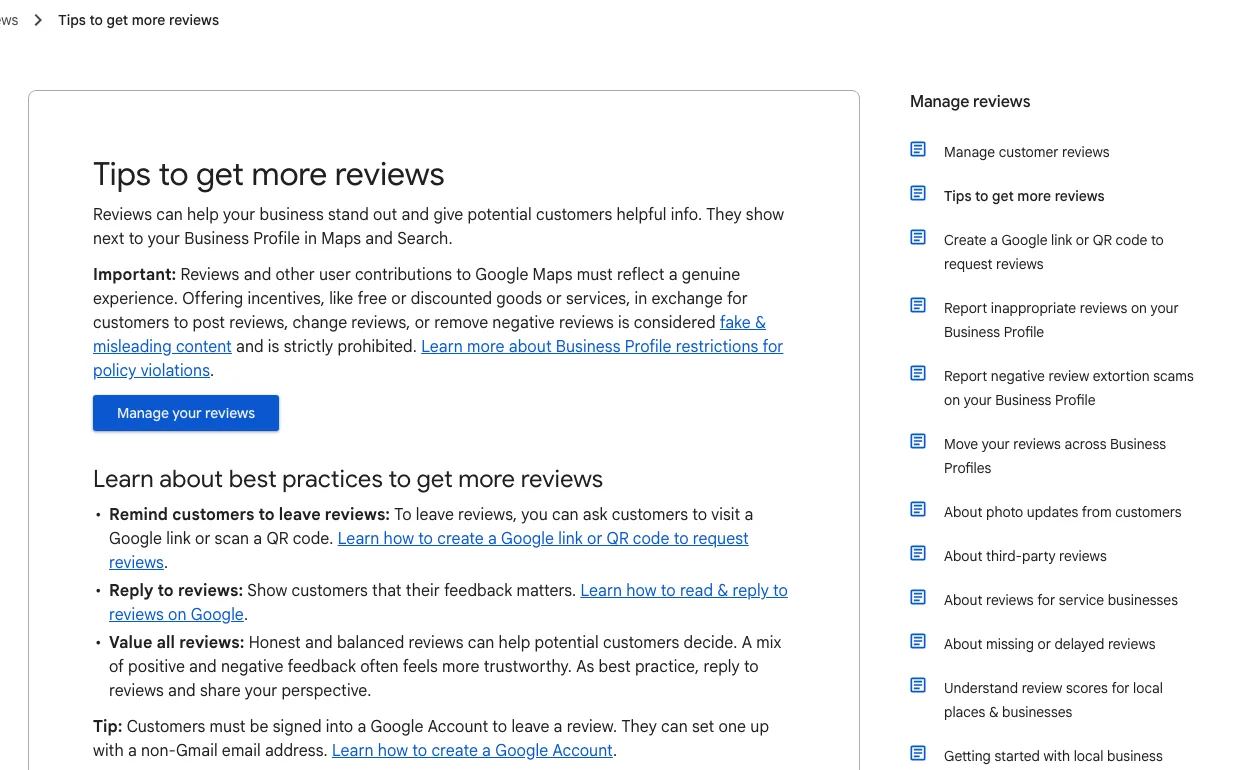
Google's rules. Google's policy for Maps content prohibits paying for reviews in money or in kind, offering discounts, freebies or other incentives for a review (or for changing or removing a negative one), selectively asking only happy customers (review gating), and pressuring people to review on your premises or telling them what to write. You may encourage genuine reviews from all customers, without incentives.
The Competition Bureau. In January 2024 the Bureau warned that employees who review their own employer or its competitors must disclose that connection, and that businesses can be liable for misleading reviews they write or allow. The Bureau's best known case here is Bell Canada, which paid a 1.25 million dollar penalty in 2015 over undisclosed employee app reviews. If someone has a connection to you, they should say so, and if you offered anything in return, it may be misleading unless it is disclosed (and Google bans it anyway).
CASL for review request emails. If you email or text customers asking for a review, treat it as a commercial electronic message to be safe. Only send to people you have consent for. Implied consent from an existing business relationship covers a purchase within the last two years or an inquiry within the last six months. Every message needs your business identity, a mailing address and contact details, and a working unsubscribe that you action within ten business days.
- Ask every customer the same way, happy or not. A card at the counter, a line on the receipt or a follow up message with your Google review link.
- Never offer anything in return, not even an entry into a draw.
- Tell staff, family and friends not to review the business, or to clearly disclose their connection if they do.
- Reply to every review, good and bad, politely and with specifics. Replies show people (and machines) that the business is active and cares.
- Spread your effort: Google first, then Yelp, plus the review sites that matter in your industry.
Our advice: This is practical guidance, not legal advice. If you run a large email programme or a regulated business, have a lawyer check your consent records.
Website basics to fix before you claim anything
Every platform you claim will ask for your website, and some (ChatGPT Business Hub among them) prefer or require one. Your website is also the one place you fully control, so it should be the clearest statement of your facts.
- Your name, address, phone and hours as real text on the contact page and in the footer, matching the facts sheet exactly.
- A page for each main service, written for customers, with your city in it naturally.
- An about page that says who runs the business and since when.
- Secure https, fast on a phone, and no important text trapped inside images or PDFs.
- Search engine and AI search crawlers allowed in robots.txt (details in how to make your website ready for AI answers).
Structured data (schema) in one paragraph
Structured data is a small block of code that restates your facts in a format machines read without guessing. For a local business the standard is LocalBusiness from schema.org, or a more specific type such as Restaurant, DaySpa, Dentist or Plumber. Google requires a name and address, and recommends telephone with the country code, url, opening hours, geo coordinates and price range. Google also says plainly that there is no special schema needed to appear in AI Overviews or AI Mode, so think of schema as making your facts unambiguous, not as a trick. The full field list is in our website guide.
Your sameAs list: every profile you own
sameAs is the part of your structured data that lists your official profiles on other sites. It tells machines that these accounts are all the same business. Build the list now, and check that each profile shows the facts from your sheet.
- Google Business Profile (your Google Maps link)
- Bing Places listing
- Apple Maps place card
- Yelp business page
- Facebook, Instagram, LinkedIn, YouTube and TikTok
- RedNote (Xiaohongshu) or WeChat if you serve Chinese speaking customers
- Industry directories and associations (for example a professional college, BBB or your BIA)
Print this
The before you claim checklist
- Facts sheet filled in and owned by one person.
- One exact name, address and phone format chosen and pasted everywhere.
- Old addresses, old phone numbers and duplicate listings found and fixed or reported.
- Primary category chosen with the “this business IS a” test; services written in customer words.
- Regular hours, holiday hours and closures correct on every platform and on the website.
- A folder of real photos: exterior with sign, interior, team, products, logo, cover.
- A written review routine that asks everyone, offers nothing and follows CASL.
- Website shows the facts as text, has service pages and lets crawlers in.
- LocalBusiness structured data planned with your sameAs list.
- Baseline recorded: run the free AI visibility check so you can see the change later.
Next step: claim your listings
With your facts sheet ready, claiming is quick. Start with how to claim your business on ChatGPT, then Google Business Profile for AI search and Bing Places and Apple Business. For the big picture, go back to the complete guide to getting found on ChatGPT and AI search.
Proof, not promises
We test it on our own business first
AI search on our own site
AI answers already send us real buyers. From August to November 2026, ChatGPT, Gemini and Perplexity sent bbmedia.ca 27 to 55 visits a month, and 9 real enquiries came to us through AI search.
Voted by the community
Voted #1 (Platinum) in Social Media Marketing and in Digital Marketing, Community Votes Markham 2026
Brands we have worked with (some of them)
- Meet Fresh
- Ten Second Noodle
- Hazukido
- QJD Peking Duck
- Gyumono
- 6 Cloud
- Noon Moment Bubble Tea
- Bento 886
- Sarang Kitchen
- Yue Spa
- Water Sense Spa
- Bliss Head Spa
- PlayPlex Game
- Paragon Badminton
- Vision Badminton
- Exact Sciences Canada
Launches we ran for clients were covered by CBC, CTV News Toronto, Toronto Life, blogTO, NOW Toronto, Streets of Toronto, Taste Toronto. See the work →
How BB Media does the groundwork for you
Most businesses we meet have three or four versions of their own address online and no one who owns the facts. We audit every listing, build your facts sheet, fix and merge what we can, and set up a review routine your staff can actually follow. Because we also build, host and manage websites, we can correct your site and its structured data directly instead of sending you a to do list.
BB Media (BrandBoosty Inc.) is based at 620 Alden Rd Unit 208 in Markham and works with businesses across the GTA and Canada, with one team for social, content, creators, ads, websites and AI search optimization. BB Media was voted #1 (Platinum) in Social Media Marketing and in Digital Marketing at Community Votes Markham 2026, and launches we ran for clients such as Meet Fresh, Ten Second Noodle, QJD Peking Duck, Hazukido and PlayPlex Game have been covered by CBC, CTV News Toronto, Toronto Life, blogTO and NOW Toronto. See the portfolio.
- Phone: +1 647-886-3125
- Email: sales@brandboosty.ca
- BB Media (BrandBoosty Inc.), 620 Alden Rd Unit 208, Markham, ON L3R 8B5, Canada. We work with brands across the GTA and Canada.
- Monday to Friday, 9:30 AM to 5:30 PM Eastern
FAQ
Do I need to fix my listings before I claim my business on ChatGPT?
You can claim in any order, but fixing your facts first makes every claim faster and stops wrong information spreading. ChatGPT may use other sources besides your profile, so those sources need to be right too.
What does NAP consistency mean?
NAP stands for name, address and phone. Consistency means writing them exactly the same way on your website and every listing, including small things like Unit vs Suite and Rd vs Road, so machines can tell all the records belong to one business.
Can I offer a discount for a Google review?
No. Google's policy bans incentives of any kind for reviews, including discounts and free items, and in Canada an undisclosed incentive can also be a misleading representation. Ask every customer the same way and offer nothing in return.
Can my staff leave reviews for the business?
They should not. The Competition Bureau says employees who review their employer or its competitors must disclose the connection, and businesses can be liable for misleading reviews they allow. Google also treats them as conflicts of interest.
Is it legal to email customers asking for a review in Canada?
Yes, if you follow CASL. Send only to people with express consent or valid implied consent (a purchase in the last two years or an inquiry in the last six months), identify your business, include a mailing address and contact details, and give a working unsubscribe.
How long does the preparation take?
For a single location business, building the facts sheet takes an afternoon. Finding and fixing old listings can take a few weeks because some directories are slow to update. The review routine never ends; it is part of running the business.
Will this alone make ChatGPT recommend my business?
Nothing guarantees a recommendation, and no honest agency will promise one. Consistent facts, a clear website and genuine reviews give AI tools the evidence they need to describe and suggest you accurately. That is the part you control.